Friday, March 13, 2009

grails create-app esb

I know it seems like a strange app to create with grails, especially when there a several other capable opensource ESBs available (mule, servicemix, openesb), but instead of asking yourself why, ask yourself why not. While it may not offer all the same features (BPEL) it's certainly a possibility for certain circumstances. This possibility was spawned together with co-worker Kit Plummer when discussing different options for an upcoming story that required email integration. At first it seemed kind of ridiculous, especially since we were already using openesb in jboss, but it started to make some sense the more we thought about it.

So how could a MVC web framework possibly replace a feature complete ESB? Well, first let me explain my background. I don't consider myself an ESB expert, but I do have some experience with ServiceMix and OpenESB (see openesb topics). In fact, my former company, let our team develop and open source 4 JBI Binding Components for RSS, SIP, UDDI, and XMPP.

Here was a short list of complaints I had with running OpenESB v2 in jboss:

  1. At first it was pretty simple to setup, install, and run for a single developer, but trying to duplicate that across a large distributed team and things get more complicated. This included the difficulty of setting it up in all of our CI and beta environments. It's not as easy as just running Glassfish which includes OpenESB.
  2. OpenESB v2 basically required Netbeans, which again isn't too hard for one developer. But asking your team to run a second unfamiliar IDE is no easy task. The OSGi based OpenESB v3 does not require Netbeans, but it does make it easier.
  3. Composite Applications are less than easy to create, test, maintain, version, deploy in CI, etc. At least not compared to a Grails WAR anyways. Being able to consistently do those 5 things over 12-24 months is really bigger than you think.
  4. Security. It's more difficult to lock it down compared to a WAR running in jboss fronted by apache.
Here are some advantages we saw in treating Grails like an ESB:
  1. Easy. Simple. Trivial for everything including: developing, maintaining, testing, deploying, versioning, securing, and installing.
  2. Grails is plugin based and has a growing number of good plugins. One of the main benefits of an ESB is leveraging all the other work so you don't have to write anything. Things like HTTP, JMS, SMTP, JDBC, RSS, XMPP, FTP, BPEL, XSLT, and FILE just to name a few. Granted many Grails plugins are web focused, but there are several similar capabilities such as HTTP, JMS, JDBC, SMTP, RSS, and Workflow. Beyond that writing your own Grails plugin is easy compared to writing your own ESB component. See the Mail plugin as an example of how easy it is to send an email in Grails.
  3. Doesn't require Netbeans. Developers can continue using their favorite IDE.
Despite all of that, I do think the case can be made better for OpenESB if your team is already using Glassfish+OpenESB (or GlassfishESB) and Netbeans. But it does make it much more difficult if your not. And I know that ServiceMix v3 was deployable as a WAR, but that was not it's default behavior. Not sure about the OSGi based v4, but I can't imagine they stopped supporting WAR deployment. Of the two I think ServiceMix reminds me more of a Grails app as far as simplicity is concerned.

There is one big disadvantage to using Grails like an ESB: fewer incoming protocols. I could be wrong on this one but with grails your probably limited HTTP and maybe JMS (outside of setting up quartz jobs and polling). But with an ESB its really unlimited (HTTP, JMS, JDBC, SMTP, SIP, XMPP).

I am sure I am missing several other key pieces, so interested in hearing from others. The nice thing is our implementation is hidden behind a REST API that could easily be supported by a bloated ESB.

Thursday, February 26, 2009

Find when a branch was created in svn

If you merge between branches and HEAD in subversion, you most likely need to know at what revision the branch was created at. Assuming you don't have the luxury of the new merging features in subversion 1.5, here is a trick I learned from the svn docs.

svn log --stop-on-copy http://server/svn/myapp/branches/myapp-1.0

This will stop once it hits the revision the branch was created at, verses continuing on until r1. Previously I would log the entire branch, and do a grep for the comments I inserted when I created the branch. Not ideal but it worked. Now I use the --stop-on-copy option and I know real quick the revision the branch was created at. Giving me the revision I need to use in the merge.

svn merge -r 546:767 http://server/svn/myapp/trunk

Can't wait until we upgrade to subversion 1.5 or a DVCS.

Tuesday, February 3, 2009

Security news for work and personal

Security Now is a popular podcast that discusses important issues related to personal computer security. It's led by TWiT (This Week in Tech) producer Leo Laporte and SpinRite creater and security expert Steve Gibson. However, it's not only for geeks like myself but very understandable by non-geeks. Each week Steve does an excellent job of explaining complicated concepts in layman terms. It's really good in that each topic applies to not only my work but also home computer security. While on my trip to Korea, I was able to get caught up on the past few episodes and consequently want to share with the Lorenzen Nation the things I have learned.

For example, one of the first things I learned when first listening to SN (Security Now) was how WEP was broken. I know I know, pretty pathetic, but I actually never knew this. My guess, or hope, is someone reading this actually didn't know it either. So if you are running a WEP wireless network at home or your business, and assuming you want that network inaccessible by outsiders, like your neighbors, then consider switching to a WPA network. Apparently joining a WEP enabled network is about as easy as joining an unsecured network.

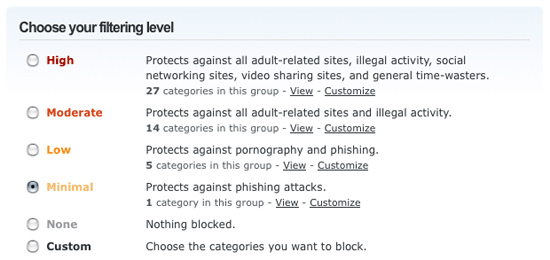
Secondly, I learned a lot about changes I could make to my home network to make it more safe and secure. Specifically, this weekend I switched my networks DNS to use OpenDNS. The main reason was for its parental controls capability. Before I made the change I was easily able to visit an adult content site. Once I switched to OpenDNS and selected the filtering ability, I was no longer able to visit these sites. Now I feel a lot more comfortable knowing that when my kids are on the computer, these sites aren't going to pop up.

Next, SN devoted several episodes to DropMyRights and Sandboxie. Both are used to help reduce windows from getting infected by malware. I would recommend any Windows user at least using DropMyRights. It's free, easy to install, and easy to use. I started using it this weekend and it's worked perfectly so far. DropMyRights was created by a Microsoft employee who wanted to login as an admin, as we all do, but still run certain applications with restricted rights. Why is that important? Well among the many things malware does, all of which require admin rights, are:

  1. Creating files in the system32 directory.
  2. Terminating various processes.
  3. Disabling the Windows Firewall.
  4. Downloading and writing files to the system32 directory.
  5. Deletes registry values in HKLM.
All of this stuff fails if the user is not an administrator. But developers hate running as a non-admin, so the solution is install DropMyRights or not run winblowz. Then to run Firefox you run something like the following: "C:\Program Files\DropMyRights\DropMyRights.exe" "C:\Program Files\Mozilla Firefox\firefox.exe".

Sandboxie, is another neat security application that lets you run any application or drive basically in a separate sandbox. So when you run Firefox in sandboxie, if malware gets installed, it's installed in the sandbox and not your OS. It's very flexible; a caller even said they ran a thumbdrive in a sandbox. This one costs money so I have yet to install it.

Finally, I learned that if you can afford over 200 PS3's and are incredibly smart about cryptography you can crack the md5 hash and create your own valid fraudulent certificate. Over the past few years, researchers have gradually weakened md5, but have finally basically broken it to where no one should be using it now in certificates. This one applies at work and home. Not only should I not be creating certificates at work using md5, but at home I should not visit sites over https that use certificates that use md5. See the resource notes for episode #177 for further information (under Breaking SSL by Spoofing a Certificate Authority). I found several trusted certificate authorities defined on my home computer that use md5. Even a few expired certificates using md2, which I guess malware could change your system time if you weren't running DropMyRights. If you want to see this in action, set your system time to August 15th, 2004 and then visit this site https://i.broke.the.internet.and.all.i.got.was.this.t-shirt.phreedom.org and check out the certificate. This will setup a secure connection using a fraudulent cerificate.

In summary, I have learned a great deal about work and home computer security by listening to the Security Now podcast. Even if I didn't understand all of the details, it has definitely made me a more aware user security-wise. Do as I did and get rid of your WEP network, switch to OpenDNS, install DropMyRights on Windows, and subscribe to the Security Now podcast (very easy in iTunes).